> ## Documentation Index
> Fetch the complete documentation index at: https://invopop-link-fix.mintlify.site/llms.txt
> Use this file to discover all available pages before exploring further.

# Reporting on France PA

> Periodic e-reporting (Flux 10) of B2C and non-regulated B2B transactions to the PPF.

export const frReportingRecordWorkflow = {
  "name": "PPF record document for reporting",
  "description": "Record a document as a Flux 10 row for French e-reporting",
  "steps": [{
    "id": "753fdc8d-80ce-4a3f-a8ca-c01158e64cf9",
    "name": "Set state",
    "provider": "silo.state",
    "summary": "Set state to `processing`{.state .processing}",
    "config": {
      "state": "processing"
    }
  }, {
    "id": "7d204bc6-f42d-4f55-b08a-fca3c19bee15",
    "name": "Record document for reporting",
    "provider": "gov-fr.reporting.record",
    "notes": "Records an invoice/payment for reporting in the local database."
  }, {
    "id": "d0660d9a-31b0-4428-b9da-bef14f7ae200",
    "name": "Set state",
    "provider": "silo.state",
    "summary": "Set state to `completed`{.state .completed}",
    "config": {
      "state": "completed"
    }
  }],
  "rescue": [{
    "id": "7ec292ea-36f2-49bb-b2ce-bb97bd6a1782",
    "name": "Set state",
    "provider": "silo.state",
    "summary": "Set state to `error`{.state .error}",
    "config": {
      "state": "error"
    }
  }]
};

export const frReportingSendWorkflow = {
  "name": "PPF send reporting document",
  "description": "Generate and send a French e-reporting transaction",
  "schema": "org/party",
  "steps": [{
    "id": "98f7aba6-8008-455d-a620-90f2bf80bf49",
    "name": "Set state",
    "provider": "silo.state",
    "summary": "Set state to `processing`{.state .processing}",
    "config": {
      "state": "processing"
    }
  }, {
    "id": "888e98ad-785b-4dc4-b610-8cf39cce9157",
    "name": "Generate reporting document",
    "provider": "gov-fr.reporting.generate",
    "summary": "Generate Transactions report (seller)",
    "config": {
      "flux_kind": "tx",
      "role": "seller"
    }
  }, {
    "id": "066eac4a-a9c2-486c-aa30-a3d6f49d7582",
    "name": "Send document for reporting",
    "provider": "gov-fr.reporting.send"
  }, {
    "id": "e5990ba3-6696-4ebe-b29a-14acd307c864",
    "name": "Set state",
    "provider": "silo.state",
    "summary": "Set state to `completed`{.state .completed}",
    "config": {
      "state": "completed"
    }
  }],
  "rescue": [{
    "id": "437ed708-bf87-491e-8447-5096ad4017c2",
    "name": "Set state",
    "provider": "silo.state",
    "summary": "Set state to `error`{.state .error}",
    "config": {
      "state": "error"
    }
  }]
};

export const WorkflowDiagram = ({workflow}) => {
  const stateColors = {
    processing: "yellow",
    sent: "blue",
    received: "blue",
    registered: "green",
    completed: "green",
    error: "red"
  };
  const StateChip = ({state, label}) => <Badge size="sm" color={stateColors[state] || "gray"} icon="square-small" iconType="solid">
      {label.charAt(0).toUpperCase() + label.slice(1)}
    </Badge>;
  const providerIcons = {
    "silo.state": "https://silo.invopop.com/images/status.svg",
    "silo.close": "https://silo.invopop.com/images/check-badge.svg",
    "silo.if": "https://assets.invopop.com/apps/silo/if.svg",
    "silo.folder": "https://silo.invopop.com/images/folder.svg",
    "silo.modify": "https://silo.invopop.com/images/modify.svg",
    "silo.correct": "https://silo.invopop.com/images/replace.svg",
    "silo.sleep": "https://assets.invopop.com/icons/sleep.svg",
    silo: "https://assets.invopop.com/apps/silo/icon.svg",
    "sequence.enumerate": "https://sequence.invopop.com/images/enumerate.svg",
    "transform.job.create": "https://transform.invopop.com/images/jobs.svg",
    webhook: "https://webhook.invopop.com/icon.svg",
    lookup: "https://lookup.invopop.com/icon.png",
    dropbox: "https://dropbox.invopop.com/icon.png",
    pdf: "https://pdf.invopop.com/file-pdf.svg",
    peppol: "https://assets.invopop.com/apps/peppol/icon.svg",
    ubl: "https://assets.invopop.com/apps/ubl/logo.svg",
    cii: "https://assets.invopop.com/apps/cii/logo.svg",
    "gov-fr": "https://assets.invopop.com/flags/fr.svg",
    "chorus-pro": "https://assets.invopop.com/apps/chroruspro/icon.svg",
    "gov-es": "https://assets.invopop.com/apps/gov-es/icon.svg",
    "gov-es.sii": "https://assets.invopop.com/apps/sii/icon.svg",
    "gov-es.ticketbai": "https://assets.invopop.com/apps/ticketbai/icon.svg",
    "gov-es.facturae": "https://assets.invopop.com/apps/facturae/icon.svg",
    verifactu: "https://assets.invopop.com/apps/verifactu/icon.svg",
    "gov-pl": "https://assets.invopop.com/apps/ksef/icon.svg",
    "gov-sa": "https://assets.invopop.com/apps/zatca/icon.svg",
    "gov-ar": "https://assets.invopop.com/apps/arca/icon.svg",
    "at-pt": "https://assets.invopop.com/apps/at-pt/icon.svg",
    "sat-mx": "https://assets.invopop.com/apps/sat-mexico/icon.svg",
    "sw-sapien": "https://assets.invopop.com/apps/sw-sapien/icon.svg",
    "sdi-it": "https://assets.invopop.com/apps/sdi-italy/icon.svg",
    "ticket-it": "https://assets.invopop.com/apps/agenzia-entrate/icon.svg",
    "nfe-br": "https://assets.invopop.com/apps/notas-fiscais-eletronicas-brazil/icon.svg",
    chargebee: "https://assets.invopop.com/apps/chargebee/icon.svg",
    stripe: "https://assets.invopop.com/apps/stripe/icon.svg",
    email: "https://assets.invopop.com/apps/email/icon.svg",
    cron: "https://assets.invopop.com/apps/cron/icon.svg",
    ilyda: "https://assets.invopop.com/apps/ilyda/icon.svg",
    invoicexpress: "https://assets.invopop.com/apps/invoicexpress/icon.svg",
    plemsi: "https://assets.invopop.com/flags/co.svg"
  };
  const iconFor = provider => {
    const parts = (provider || "").split(".");
    for (let i = parts.length; i > 0; i--) {
      const url = providerIcons[parts.slice(0, i).join(".")];
      if (url) return url;
    }
    return null;
  };
  const StepIcon = ({provider}) => {
    const url = iconFor(provider);
    return <span title={provider} className="flex h-7 w-7 shrink-0 items-center justify-center rounded-md border border-gray-950/10 bg-white dark:border-white/10 dark:bg-white/5">
        {url ? <img src={url} alt="" className="h-4 w-4" /> : null}
      </span>;
  };
  const renderSummary = summary => {
    const nodes = [];
    const re = /`([^`]+)`(\{[^}]*\})?/g;
    let last = 0;
    let m;
    let k = 0;
    while ((m = re.exec(summary)) !== null) {
      if (m.index > last) nodes.push(summary.slice(last, m.index));
      const attrs = m[2] || "";
      if (attrs.indexOf(".state") >= 0) {
        const state = (attrs.match(/\.state\s+\.([\w-]+)/) || [])[1] || m[1];
        nodes.push(<StateChip key={k++} state={state} label={m[1]} />);
      } else if (attrs) {
        nodes.push(<span key={k++} className="text-sm font-medium text-gray-700 dark:text-gray-300">
            {m[1]}
          </span>);
      } else {
        nodes.push(<code key={k++} className="text-sm rounded bg-gray-100 px-1 font-mono text-sm dark:bg-white/10">
            {m[1]}
          </code>);
      }
      last = m.index + m[0].length;
    }
    if (last < summary.length) nodes.push(summary.slice(last));
    return nodes;
  };
  const NoteRow = ({text}) => <div className="mt-4 mb-1 font-mono text-sm leading-5 text-gray-400 dark:text-gray-500">{"// " + text}</div>;
  const renderSteps = (steps, counter) => (steps || []).map(step => {
    counter.n += 1;
    const n = counter.n;
    const branches = (step.next || []).filter(b => b.steps && b.steps.length > 0);
    return <div key={step.id || "step-" + n}>
          {step.notes ? <NoteRow text={step.notes} /> : null}
          <div className="mt-2.5 flex items-center">
            <span className="absolute left-0 w-10 text-center font-mono text-sm text-gray-400 select-none dark:text-gray-500">
              {n}
            </span>
            <div className="flex min-w-0 flex-1 items-center gap-2 rounded-xl border border-gray-950/5 bg-white px-2 py-2 dark:border-white/10 dark:bg-gray-900">
              <StepIcon provider={step.provider} />
              <span className="text-sm shrink-0 font-medium text-gray-900 dark:text-gray-100">{step.name}</span>
              {step.summary ? <span className="text-sm min-w-0 truncate text-gray-500 dark:text-gray-400">{renderSummary(step.summary)}</span> : null}
            </div>
          </div>
          {branches.length > 0 ? <div className="ml-5 border-l border-gray-200 -my-1 py-1 pl-6 dark:border-white/10">
              {branches.map((branch, bi) => <div key={branch.code || branch.status || bi}>
                  <div className="mt-4">
                    <span className="rounded-md bg-gray-200/70 px-2 py-1 font-mono text-sm text-gray-600 dark:bg-white/10 dark:text-gray-300">
                      {branch.code || branch.status}
                    </span>
                  </div>
                  {renderSteps(branch.steps, counter)}
                </div>)}
            </div> : null}
        </div>;
  });
  const counter = {
    n: 0
  };
  const wf = workflow || ({});
  return <div className="not-prose relative my-5 rounded-2xl border border-gray-950/5 bg-gray-50 py-3 pr-4 pb-5 pl-12 dark:border-white/10 dark:bg-white/[0.03]">
      {renderSteps(wf.steps, counter)}
      {wf.rescue && wf.rescue.length > 0 ? <div className="mt-6 border-t border-dashed border-gray-300 dark:border-white/10">
          <NoteRow text="If any step fails" />
          {renderSteps(wf.rescue, counter)}
        </div> : null}
    </div>;
};

E-reporting covers everything that is out of scope for regulated e-invoicing (B2C sales, cross-border B2B, and any flow where one party is not registered in the Annuaire). Instead of routing each invoice individually, you **record** each invoice and payment, Invopop generates a Flux 10 XML for each reporting window, and sends it to the PPF.

Reports use the [fr-ctc-flow10-v1](https://docs.gobl.org/addons/fr-ctc-flow10-v1) add-on.

## Sub-flows

Each recorded document is classified into one of four sub-flows based on supplier and customer SIREN:

| Flow   | Scope                      |
| ------ | -------------------------- |
| `10.1` | International B2B invoices |
| `10.2` | International B2B payments |
| `10.3` | Domestic B2C invoices      |
| `10.4` | Domestic B2C payments      |

## Recording workflow

Every invoice and payment that requires reporting goes through a single **Record** workflow. The action looks at the supplier and customer SIRENs and files the document into the right sub-flow (10.1 to 10.4) ready for the next report.

<Card iconType="duotone" title="PPF record document for reporting" icon="code-branch" href="https://console.invopop.com/redirect/workflows/new?template=fr-fr-reporting-record" horizontal>
  Add to my workspace →
</Card>

<Tabs>
  <Tab title="Workflow">
    <WorkflowDiagram workflow={frReportingRecordWorkflow} />
  </Tab>

  <Tab title="Code">
    ```json Reporting record document workflow theme={null}
    {
        "name": "PPF record document for reporting",
        "description": "Record a document as a Flux 10 row for French e-reporting",
        "steps": [
            {
                "id": "753fdc8d-80ce-4a3f-a8ca-c01158e64cf9",
                "name": "Set state",
                "provider": "silo.state",
                "summary": "Set state to `processing`{.state .processing}",
                "config": {
                    "state": "processing"
                }
            },
            {
                "id": "7d204bc6-f42d-4f55-b08a-fca3c19bee15",
                "name": "Record document for reporting",
                "provider": "gov-fr.reporting.record",
                "notes": "Records an invoice/payment for reporting in the local database."
            },
            {
                "id": "d0660d9a-31b0-4428-b9da-bef14f7ae200",
                "name": "Set state",
                "provider": "silo.state",
                "summary": "Set state to `completed`{.state .completed}",
                "config": {
                    "state": "completed"
                }
            }
        ],
        "rescue": [
            {
                "id": "7ec292ea-36f2-49bb-b2ce-bb97bd6a1782",
                "name": "Set state",
                "provider": "silo.state",
                "summary": "Set state to `error`{.state .error}",
                "config": {
                    "state": "error"
                }
            }
        ]
    }
    ```
  </Tab>
</Tabs>

### Payments

For `10.2` international B2B payments set `lines[i].document` on the payment to the invoice it settles. The minimum reference is the invoice number and issue date:

```json theme={null}
{ "code": "INVOICE-NUMBER", "issue_date": "2026-05-15" }
```

This is what tells the record action to file the payment as `10.2` (international B2B payment) rather than `10.4` (domestic B2C payment), and allows GOBL to allocate the cashed amount across the invoice's VAT rates for you.

For B2C payments (`10.4`), specify the tax breakdown directly on the payment line:

```json theme={null}
"lines": [
  {
    "amount": "120.00",
    "tax": {
      "categories": [
        {
          "code": "VAT",
          "rates": [{ "base": "100.00", "percent": "20%", "amount": "20.00"}]
        }
      ]
    }
  }
]
```

### Exemption reasons

Lines using `exempt`, `reverse-charge`, `intra-community`, `export`, or `outside-scope` rates must include a free-text reason. Add it to the invoice's tax block:

```json theme={null}
{
  "tax": {
    "notes": [
      {
        "cat": "VAT", 
        "key": "intra-community", 
        "text": "Exonération article 262 ter I du CGI — livraison intracommunautaire"
      }
    ]
  }
}
```

The `key` must match the rate used on the line. Lines on `standard` or `zero` rates do not need a note.

## Submitting reports

A separate workflow bundles the records for a closed reporting window into a single Flux 10 report and sends it to the PPF. Invopop runs it automatically on the cadence set by the VAT regime — you do not need to trigger it.

<Card iconType="duotone" title="PPF generate and send reporting document" icon="code-branch" href="https://console.invopop.com/redirect/workflows/new?template=fr-fr-reporting-send" horizontal>
  Add to my workspace →
</Card>

<Tabs>
  <Tab title="Workflow">
    <WorkflowDiagram workflow={frReportingSendWorkflow} />
  </Tab>

  <Tab title="Code">
    ```json Reporting send document workflow theme={null}
    {
        "name": "PPF send reporting document",
        "description": "Generate and send a French e-reporting transaction",
        "schema": "org/party",
        "steps": [
            {
                "id": "98f7aba6-8008-455d-a620-90f2bf80bf49",
                "name": "Set state",
                "provider": "silo.state",
                "summary": "Set state to `processing`{.state .processing}",
                "config": {
                    "state": "processing"
                }
            },
            {
                "id": "888e98ad-785b-4dc4-b610-8cf39cce9157",
                "name": "Generate reporting document",
                "provider": "gov-fr.reporting.generate",
                "summary": "Generate Transactions report (seller)",
                "config": {
                    "flux_kind": "tx",
                    "role": "seller"
                }
            },
            {
                "id": "066eac4a-a9c2-486c-aa30-a3d6f49d7582",
                "name": "Send document for reporting",
                "provider": "gov-fr.reporting.send"
            },
            {
                "id": "e5990ba3-6696-4ebe-b29a-14acd307c864",
                "name": "Set state",
                "provider": "silo.state",
                "summary": "Set state to `completed`{.state .completed}",
                "config": {
                    "state": "completed"
                }
            }
        ],
        "rescue": [
            {
                "id": "437ed708-bf87-491e-8447-5096ad4017c2",
                "name": "Set state",
                "provider": "silo.state",
                "summary": "Set state to `error`{.state .error}",
                "config": {
                    "state": "error"
                }
            }
        ]
    }
    ```
  </Tab>
</Tabs>

<Info>
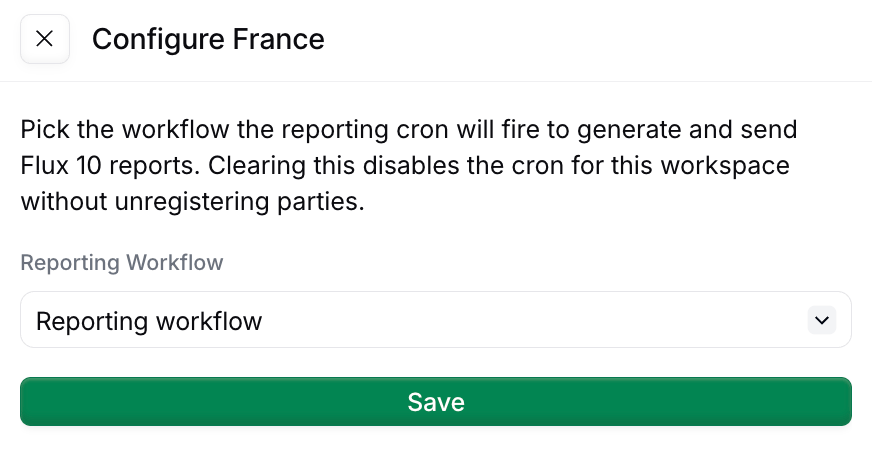
  Tell Invopop which workflow to run on the schedule: in the **Apps** view, open the **France** app, click **Configure** to open the configuration sidebar, and select this workflow under **Reporting Workflow**.
</Info>

<Frame caption="Selecting the reporting workflow in the France app configuration sidebar">
  <img src="https://mintcdn.com/invopop-link-fix/1lP6Ab0d1FMqmHMb/assets/guides/fr-configure.png?fit=max&auto=format&n=1lP6Ab0d1FMqmHMb&q=85&s=067ab68c1b53b8d7b10cf1f453192542" width="550" alt="France app configuration sidebar with the Reporting Workflow selector" data-path="assets/guides/fr-configure.png" />
</Frame>

You can also trigger this workflow manually against any registered party — useful for testing, or to bring a party up to date after onboarding.

### Picking a VAT regime at supplier registration

If you have a single supplier, or all your suppliers have the same cadence, you can configure the **Register party for reporting** step in the [PPF register supplier workflow](/guides/fr-pa-registration#ppf-register-supplier-workflow) to a specific cadence.

For multiple suppliers (whitelabel use cases) where different suppliers have different cadence, pass it as a job argument with key `vat-regime` when creating the job. When not stated, the default is `real_normal_monthly`.

| VAT regime               | `args.vat-regime`       |
| ------------------------ | ----------------------- |
| Monthly Actual (default) | `real_normal_monthly`   |
| Quarterly Actual         | `real_normal_quarterly` |
| Simplified VAT           | `simplified`            |
| Non-Established Taxpayer | `franchise`             |

The cadence must match the regime registered with the tax office. If in doubt, check with your local accountant.

## Reading what's filed

Four read endpoints expose submission status and the raw report XML, all scoped to the party's silo entry id:

<Badge color="green" size="sm">GET</Badge> `/v1/reports/:silo_entry_id` <br />
Summary per kind (current window, next deadline, last filed report)

<Badge color="green" size="sm">GET</Badge> `/v1/reports/:silo_entry_id/periods` <br />
Paginated history of filed periods (filter with `?kind=tx` or `?kind=py`)

<Badge color="green" size="sm">GET</Badge> `/v1/reports/:silo_entry_id/periods/:period_id` <br />
A single period's metadata

<Badge color="green" size="sm">GET</Badge> `/v1/reports/:silo_entry_id/periods/:period_id/xml` <br />
The raw report XML sent to the PPF

## FAQ

<AccordionGroup>
  <Accordion title="How do I schedule periodic reports for France?">
    For TVA, file via DGFiP's portal — Invopop does not generate CA3 yet. For e-reporting (Flow 10): submit via your Plateforme Agréée — Invopop's e-reporting workflow batches transactions per period and submits to the PPF.
  </Accordion>

  <Accordion title="What format does France expect for periodic reports?">
    TVA: DGFiP's EDI-TVA XML schema. E-reporting Flow 10: a structured JSON/XML payload defined by the PPF specification (currently in beta). Invopop emits Flow 10 via the upcoming `fr-ctc-flow10-v1` GOBL addon.
  </Accordion>

  <Accordion title="How often must I submit France PA reports?">
    Flow 10 e-reporting: 3× per month (every 10 days) for B2C and cross-border transactions. Lifecycle status (CDAR): per event, near real-time. Specific deadlines depend on the supplier's tax filing cadence (monthly/quarterly).
  </Accordion>

  <Accordion title="What format does France PA expect for periodic reports?">
    Flow 10 uses a JSON envelope wrapping aggregated transaction data, defined in the PPF technical specification. Lifecycle CDAR payloads are XML messages exchanged over Peppol with structured status codes.
  </Accordion>
</AccordionGroup>

More available in our [France FAQ](/faq/france) section

***

<AccordionGroup>
  <Accordion title="🇫🇷 Invopop resources for France">
    |            |                                                                                                                                                                                                                                                                                                                                                                                       |
    | ---------- | ------------------------------------------------------------------------------------------------------------------------------------------------------------------------------------------------------------------------------------------------------------------------------------------------------------------------------------------------------------------------------------- |
    | Compliance | <Icon icon="https://assets.invopop.com/flags/fr.svg" /> [Invoicing compliance in France](/compliance/france)<br /> <Icon icon="timeline" /> [Compliance timeline](/timelines/france)                                                                                                                                                                                                  |
    | Apps       | <Icon icon="https://assets.invopop.com/flags/fr.svg" /> [France](/apps/france)<br /><Icon icon="https://assets.invopop.com/apps/peppol/icon.svg" /> [Peppol](/apps/peppol)<br /><Icon icon="https://assets.invopop.com/apps/chroruspro/icon.svg" /> [Chorus Pro France](/apps/choruspro-france)                                                                                       |
    | Guides     | <Icon icon="book" /> Chorus Pro — [Supplier registration](/guides/fr-chorus-pro-supplier) · [Issuing invoices](/guides/fr-chorus-pro)<br /><Icon icon="book" /> [PA Guide](/guides/fr-pa) — [Registration](/guides/fr-pa-registration) · [Invoicing](/guides/fr-pa-invoicing) · [Status](/guides/fr-pa-status) · [Reporting](/guides/fr-pa-reporting)                                 |
    | FAQ        | <Icon icon="square-question" /> [France FAQ](/faq/france)                                                                                                                                                                                                                                                                                                                             |
    | GOBL       | <Icon icon="https://assets.invopop.com/icons/gobl.svg" />  [France Tax Regime](https://docs.gobl.org/regimes/fr)<br /> <Icon icon="https://assets.invopop.com/icons/gobl.svg" /> [Chorus Pro Addon](https://docs.gobl.org/addons/fr-choruspro-v1)<br /> <Icon icon="https://assets.invopop.com/icons/gobl.svg" /> [French Factur-X Addon](https://docs.gobl.org/addons/fr-facturx-v1) |
    | GitHub     | <Icon icon="github" /> [gobl.xinvoice](https://github.com/invopop/gobl.xinvoice)                                                                                                                                                                                                                                                                                                      |
  </Accordion>
</AccordionGroup>